

Activating your Internet Download Manager (IDM) with an official serial key unlocks the full version with lifetime or 1-year updates.
Follow these simple steps to activate your software:
Step 1: Install the Latest Version of IDM
Before registering, make sure you have downloaded and installed the latest version of IDM on your computer.
Step 2: Open the Registration Menu
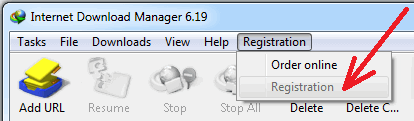
Open the Internet Download Manager program.
Look at the top menu bar and click on Registration.
Click on the Registration option in the dropdown list.
Note: If the Registration button is greyed out (disabled), it means your IDM is already registered and active.
Step 3: Copy Your Serial Key
To avoid typing errors between numbers and letters (like zero 0 and letter O, or number 1 and letter I), always Copy and Paste your key:
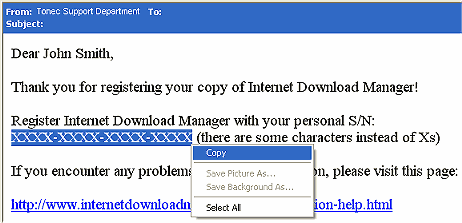
Open the text file or email containing your purchased serial key.
Highlight your 20-digit serial number.
Right-click and select Copy (or press
Ctrl + Con your keyboard).
Step 4: Enter Your Details and Paste the Key
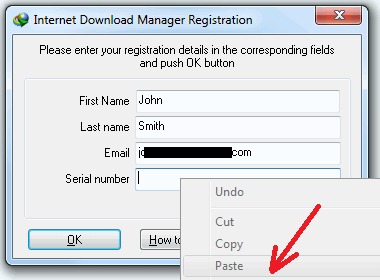
In the IDM registration window that appears on your screen:
Enter your First Name and Last Name.
Enter your Email Address.
Right-click inside the Serial Number box and select Paste (or press
Ctrl + V).Click OK to complete the registration.
Step 5: Verify Your IDM Full License
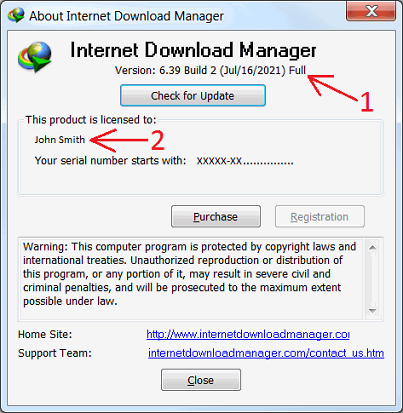
To confirm that your activation was successful:
Click on Help in the top menu.
Select About IDM.
You should clearly see the word Full next to the version details and your registered name displayed at the bottom.
Troubleshooting Tip: If you see any activation error or fake serial popup during registration, make sure your internet connection is active and verify that you copied the complete serial key without any accidental spaces at the beginning or end.
Buy Genuine IDM Licenses
Ready to get your official serial key? Order directly from our store with instant support:
Note: Every license key is 100% genuine and supports re-installation on your PC.