

Common questions answered in this guide:
I used a crack/patch and IDM showed a message about using a fake serial. I purchased an official license, but this message still appears. How do I register IDM now?
How can I enter a new name, email, or serial number if the "Registration → Registration" menu item is disabled/greyed out?
If you previously used an unauthorized patch or crack, IDM may block activation and continuously show a "Fake Serial Number" error popup. Even after purchasing a genuine license, the Registration → Registration menu option might be disabled.
You do not need to download any extra tools to fix this. Simply follow the steps below to reset the window and register your genuine license key.
Step 1: Force Open the Registration Dialog
To re-enable the registration window, you just need to click the official IDM reset link below. This will bypass the disabled menu and force the IDM app on your computer to ask for your license details again.
Click Here to Reset Registration
(Clicking this link will safely trigger your Internet Download Manager to open a fresh registration popup on your screen.)
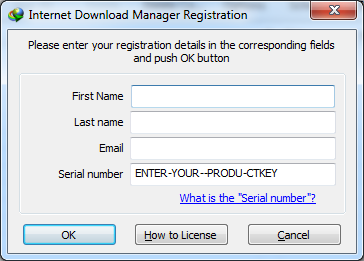
Step 2: Enter Your Official Serial Key
Once the registration window pops up:
Enter your First Name, Last Name, and Email Address.
Copy and Paste your genuine 20-digit serial number into the Serial Number field.
Click OK to complete your activation.
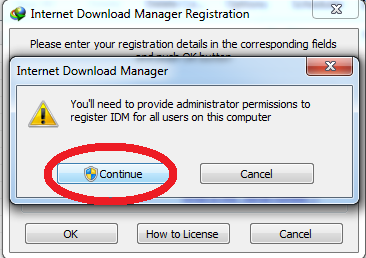
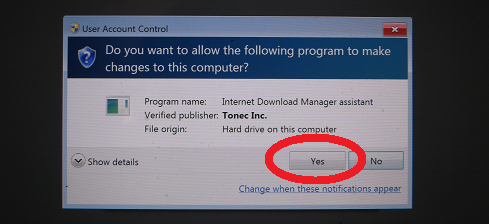
Step 3: Verify Your Activated Full Version
Go to Help → About IDM in the top menu.
Confirm that your status shows Full and your registered name is displayed.
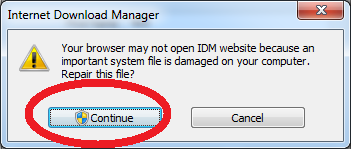
Troubleshooting: Clean Up Modified Windows Hosts File (If Needed)
If the steps above do not work, the old crack may have modified your Windows hosts file to block IDM servers. You must clear it manually:
Open File Explorer and go to:
C:\Windows\System32\drivers\etcLocate the file named
hosts.Right-click on
hosts, select Open with, and choose Notepad (Run as Administrator).Delete any lines containing
internetdownloadmanager.comortonec.com(for example:127.0.0.1 registeridm.com).Save the file, restart your PC, and click the reset link in Step 1 again.
Choose Your Official IDM Plan
Avoid fake serial popups and malware by using 100% genuine licenses:
Feature | IDM 1-Year License | IDM Lifetime License |
License Duration | 1 Year Full Access | Permanent (Never Expires) |
Official Updates | 1 Year of Free Upgrades | 3 Full Years of Free Upgrades |
Device Limit | 1 Windows PC | 1 Windows PC |
Key Recovery | Full 1-Year Assistance | Lifetime Support |
Order Link |
Need Direct Support? If you are still seeing the fake serial warning, please contact our support team with your Order ID:
WhatsApp: https://z-t.biz/whatsapp
Telegram: https://z-t.biz/telegram