

Common questions answered in this guide:
Can I pay for my order using Altcoins or Meme coins?
How do I search for and select my preferred cryptocurrency on MixPay?
How do I ensure network fees do not disrupt my payment?
How do I verify my crypto payment with customer support for instant activation?
Zaintech Technologies supports payments via 120+ cryptocurrencies, including major Altcoins (Solana, Ethereum, Litecoin, Tron, Monero) and popular Meme coins (Dogecoin, Shiba Inu, Pepe, etc.), processed seamlessly through the MixPay gateway.
Follow the step-by-step visual instructions below to complete your payment using your preferred token.
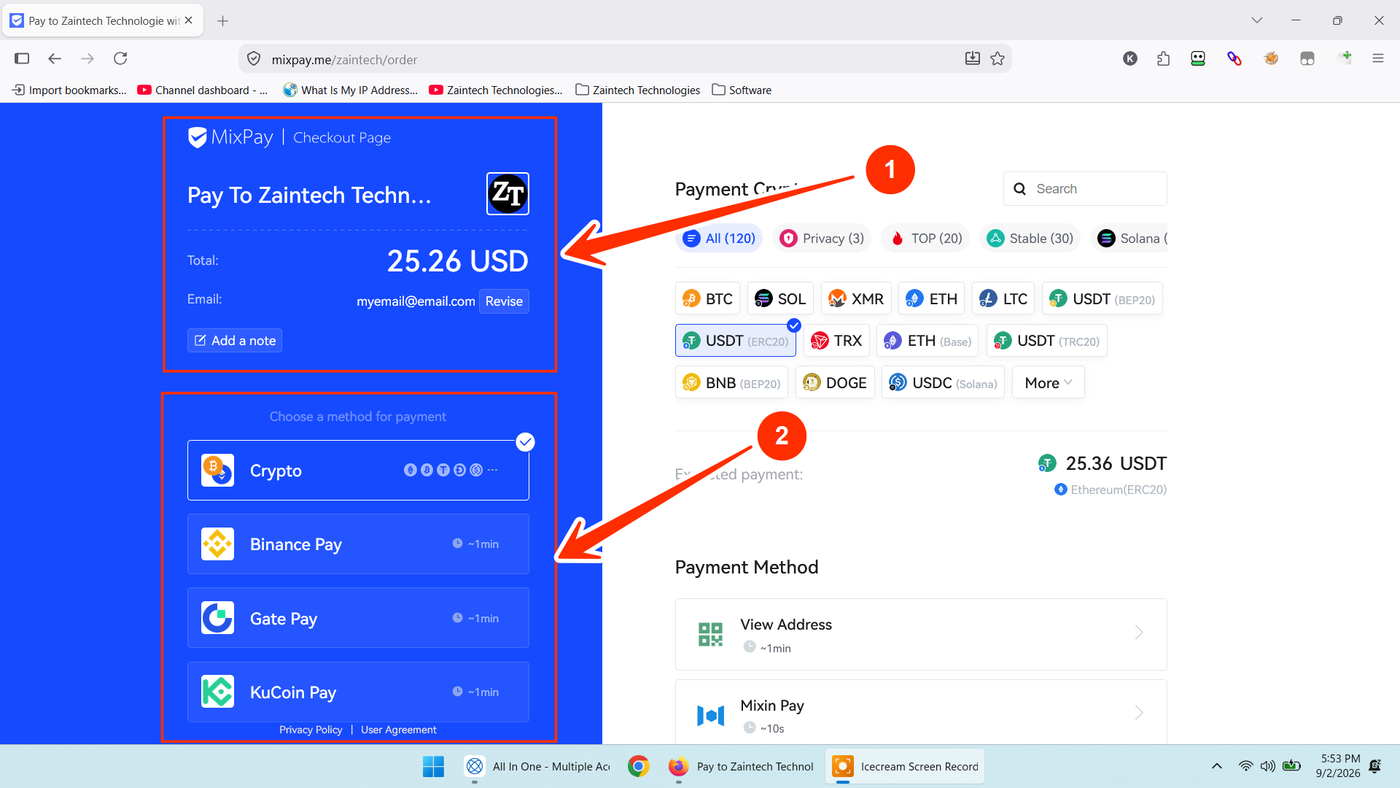
Step 1: Verify Order Details on the MixPay Checkout Page
When redirected to MixPay from the Zaintech Technologies checkout:
Verify Merchant Details: Ensure the top-left corner displays Pay To Zaintech Technologies alongside our official logo.
Review Amount & Email: Check the total USD amount and verify your contact email address (a receipt will be delivered here once settled).
Select Crypto: Under Choose a method for payment on the left panel, locate the Crypto option.
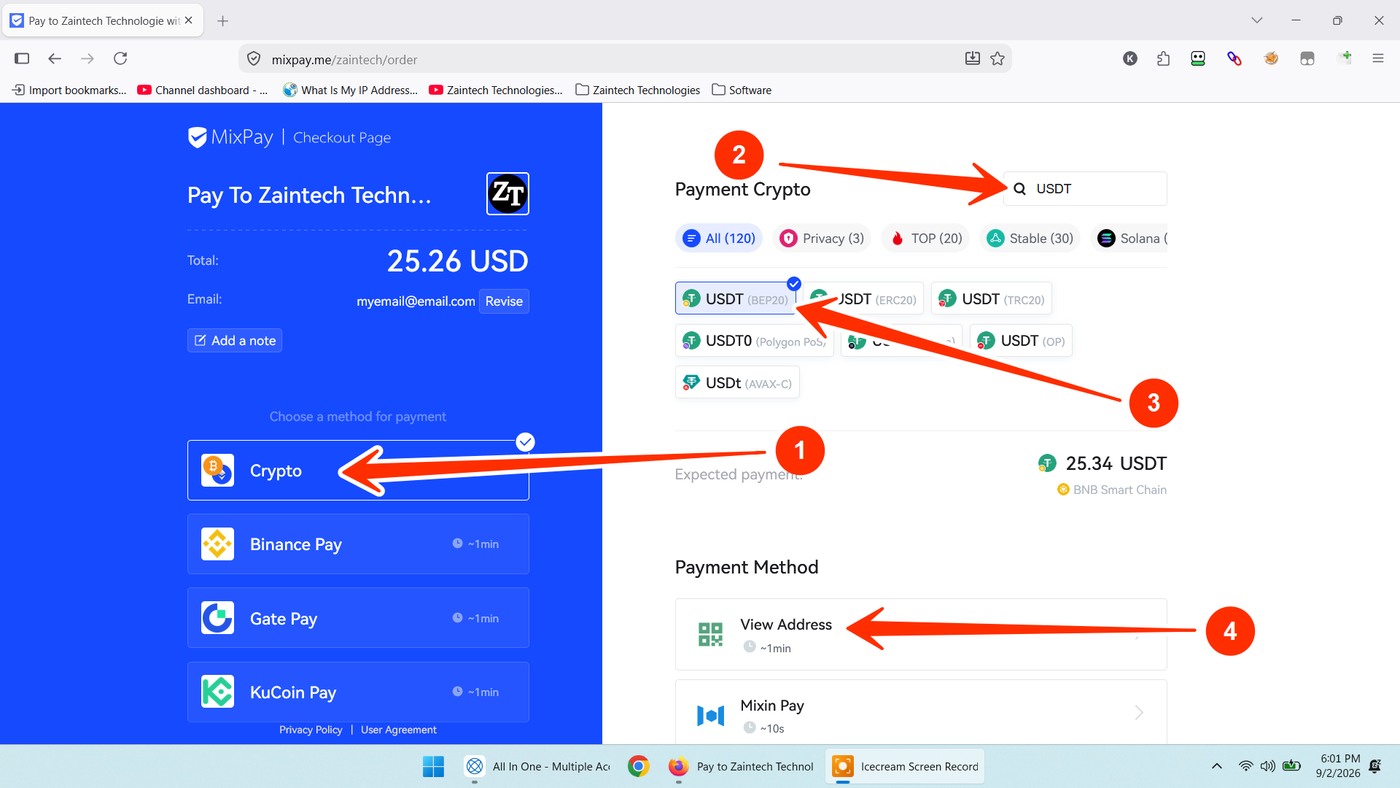
Step 2: Search for Your Altcoin or Meme Coin & Select Network
Click on Crypto in the left-hand menu (arrow 1).
Go to the search field labeled "Search" in the upper-right section (arrow 2).
Type the name or ticker symbol of the coin you want to use (e.g.,
SOL,DOGE,TRX,SHIB,PEPE, orUSDT).Choose Your Network: If your selected coin operates across multiple blockchains (such as USDT), select your desired network (arrow 3), such as USDT (BEP20) or USDT (TRC20).
Click the "View Address" button at the bottom right (arrow 4).
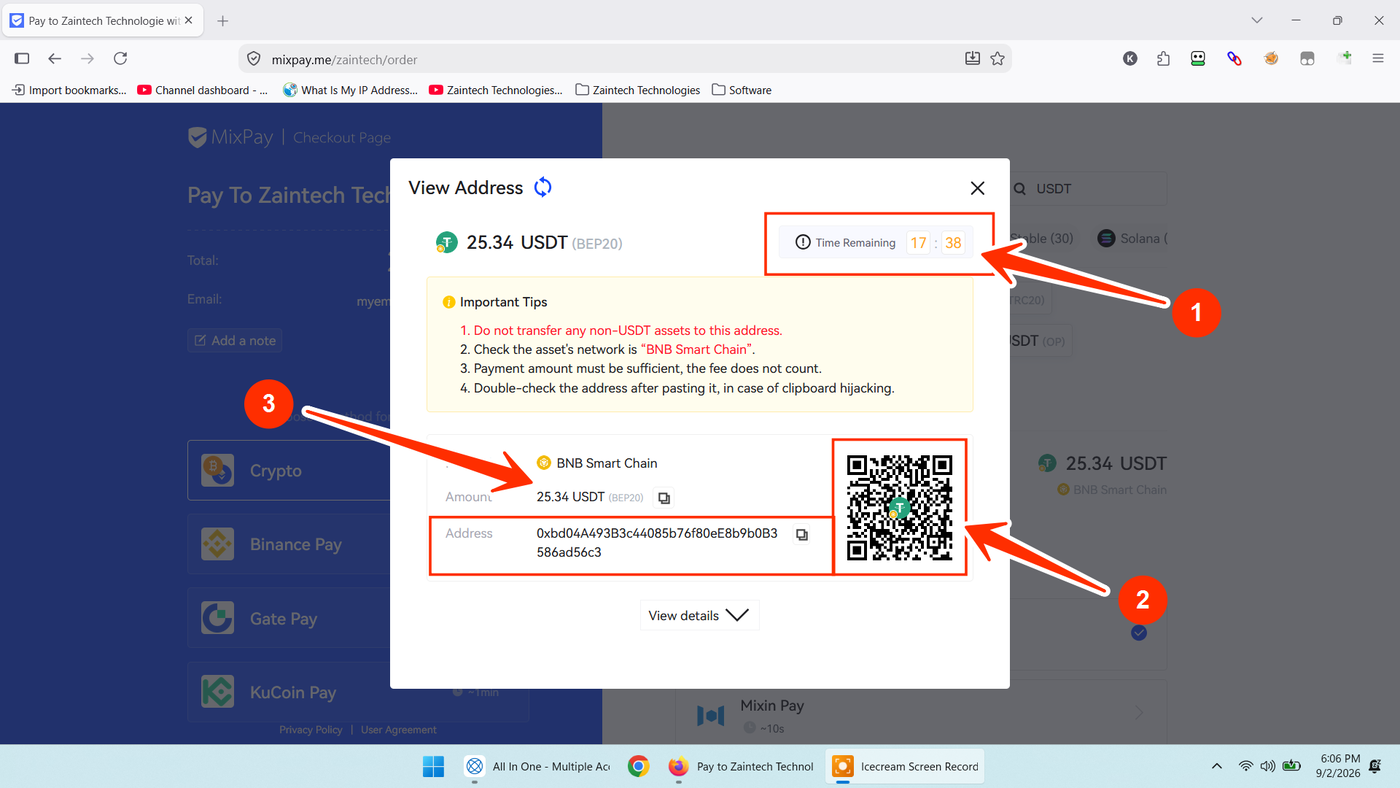
Step 3: Complete the Transfer
A modal window will display your exact payment parameters:
Check the Timer: Note the Time Remaining countdown at the top right (arrow 1). Complete your wallet transfer before this window closes to lock in the real-time conversion rate.
Copy the Address or Scan QR: Scan the QR code using your mobile crypto wallet (Trust Wallet, MetaMask, Phantom, etc.) or click the copy icon next to the deposit address (arrow 2).
Send the Exact Amount: Copy and send the exact numeric amount shown (arrow 3).
Crucial Fee Warning: Centralized exchanges (e.g., Binance, KuCoin, Bybit) frequently deduct withdrawal network fees directly from the withdrawal total. Always ensure that the net amount received by the address matches the required amount exactly, or the gateway may hold the payment as underpaid.
Step 4: Submit Payment Proof for Instant Dashboard Authorization
Because on-chain confirmations vary by network, sharing your payment confirmation directly ensures your order is authorized within 5 to 10 minutes:
Take a screenshot of the completed transfer confirmation in your wallet or exchange.
Copy the Transaction Hash (TxID) or the direct blockchain explorer link (e.g., BscScan, Solscan, TronScan). Providing the direct link allows our team to verify your transaction instantly without manual typing errors.
Send your Order ID, screenshot, and transaction link to our team:
WhatsApp Support: https://z-t.biz/whatsapp
Telegram Support: https://z-t.biz/telegram
Once confirmed, your license key or voucher code will be released immediately inside your account dashboard.