

Target Audience: This guide is specifically for new users who do not currently have an existing HMA VPN account and are redeeming an official reseller license code purchased from our store.
Follow these simple steps to register your fresh account, redeem your activation key, and start using HMA VPN across all your devices:
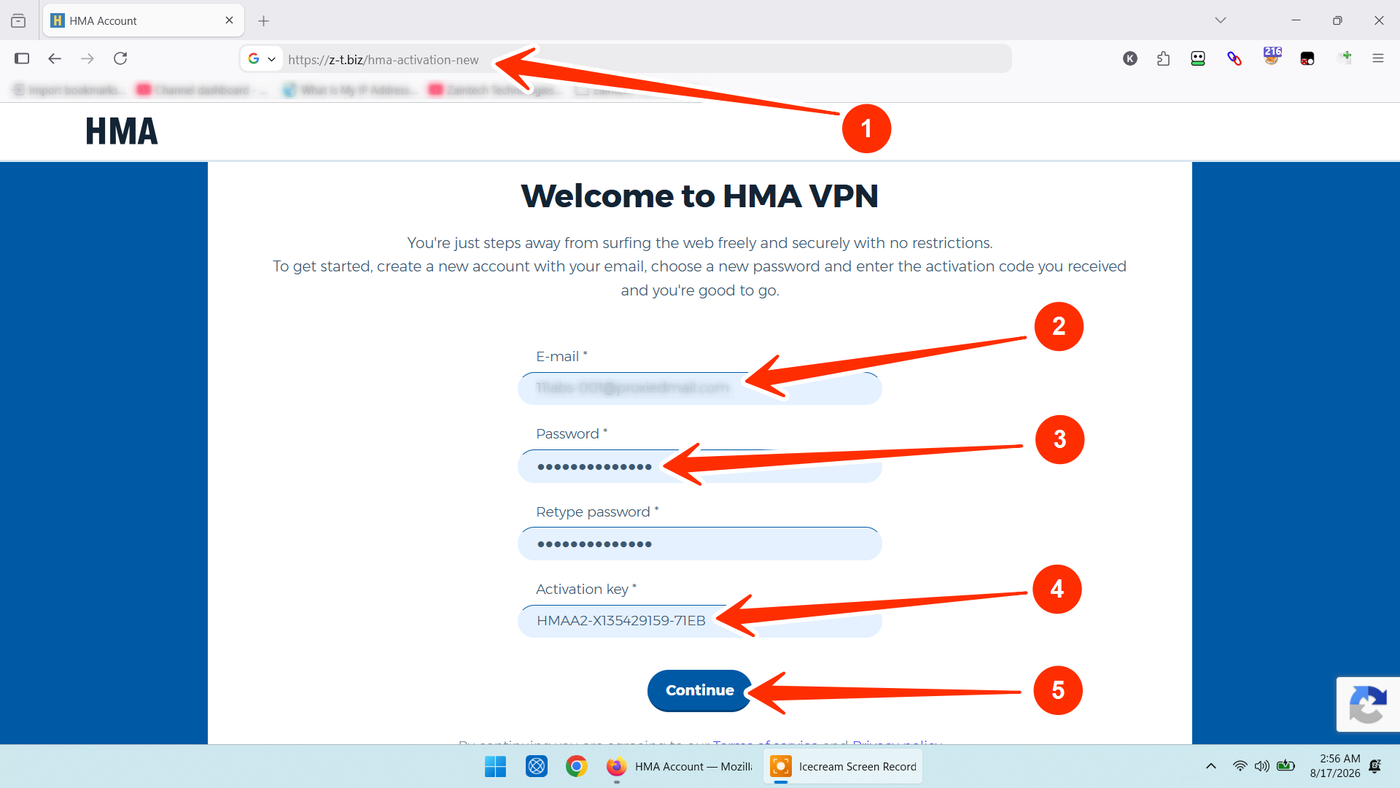
Step 1: Open the Official Activation Page
Click or copy the direct activation link below into your web browser:
https://z-t.biz/hma-activation-new
Step 2: Fill in Account & Activation Details
On the activation form, enter your information in the following fields:
E-mail: Enter a fresh email address that has never been registered on HMA VPN before.
Password: Set a strong password for your new HMA account.
Retype password: Re-enter the exact same password to confirm.
Activation key: Copy and paste the official license/reseller code you received from your store order.
Tip: Ensure there are no accidental spaces at the beginning or end of the pasted code.
Click the blue Continue button to submit your registration.
Step 3: Verify Your Email Address
HMA will send a confirmation email to the inbox you provided.
Open your email, locate the message from HMA VPN, and click the verification link/button to confirm your account.
Once verified, your subscription package is officially active.
Step 4: Download App & Log In on Any Device
Now that your account and subscription are set up:
Download the official HMA VPN application for your device (Windows, macOS, Android, or iOS).
Launch the app and click Log In / Sign In.
Enter your registered Email Address and Password (created in Step 2).
Your full premium VPN subscription will load automatically—simply click Connect to secure your internet connection!
Need Help or Have Questions?
If you experience any issues while creating your account or redeeming your activation key, reach out directly with your Order ID:
WhatsApp Support: https://z-t.biz/whatsapp
Telegram Support: https://z-t.biz/telegram